So you want to work in AI or data science. Maybe you come from physics, biology, or economics. Maybe you’re a complete beginner. Either way, one question comes up first: where do you start?
The answer is Python. Not because it sounds impressive, but because it is the language that drives every major AI system on the planet. This guide walks you through exactly why Python matters, how to install it, and how to run your first real data science code.
Why Python Wins for AI
You could learn R, Java, or C++. Each has its place. But for AI and data science, Python stands alone. Here is why.
First, Python is the number one language for AI worldwide — not a close second. Google DeepMind, OpenAI, Meta AI, and every major research lab build on Python. Second, the syntax reads almost like English. You focus on your idea, not on semicolons and type declarations.
Third — and this is crucial — Python has an extraordinary ecosystem of free libraries. Want to train a neural network? There is a library for that. Want to clean a messy dataset? One command away. Fourth, you can test an idea in five minutes. No compilation, no waiting. Finally, millions of developers use Python. If you get stuck, someone has already solved your exact problem and posted the answer online.
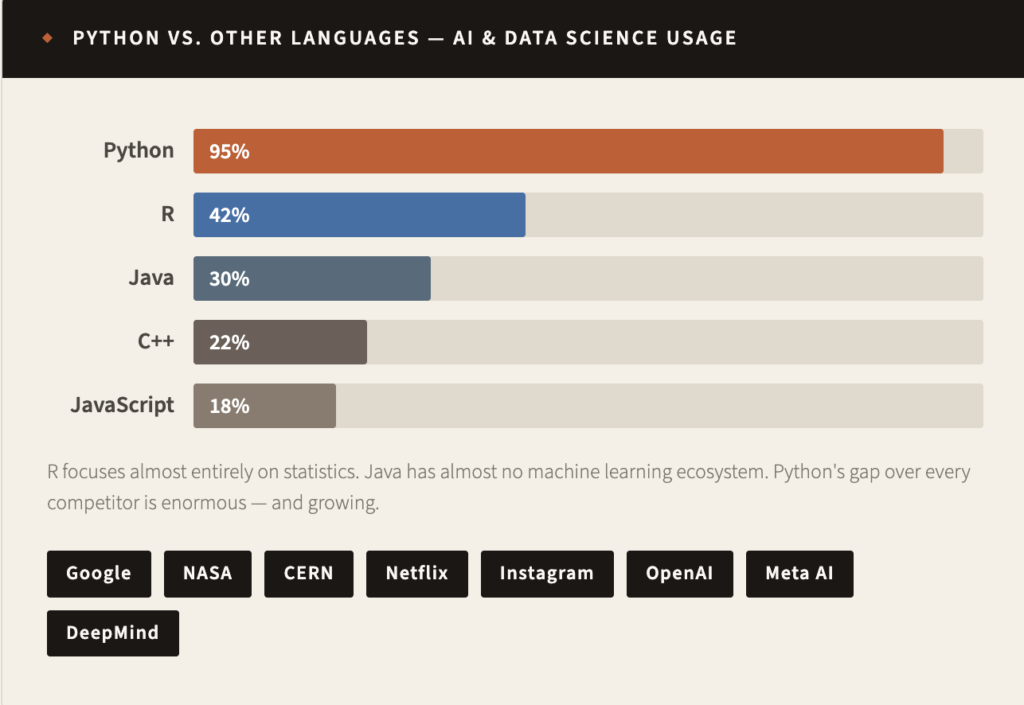
When you learn Python, you join the same ecosystem that powers self-driving cars, medical diagnosis AI, climate models, and ChatGPT itself. This is not a niche skill. This is the skill of the 21st century.
Python’s AI Superpowers: The Libraries
Think of Python as a smartphone. The language is the hardware. The libraries are the apps. And for AI and data science, these apps are world-class.
Here are the six libraries that form your complete AI toolkit. All of them are free.
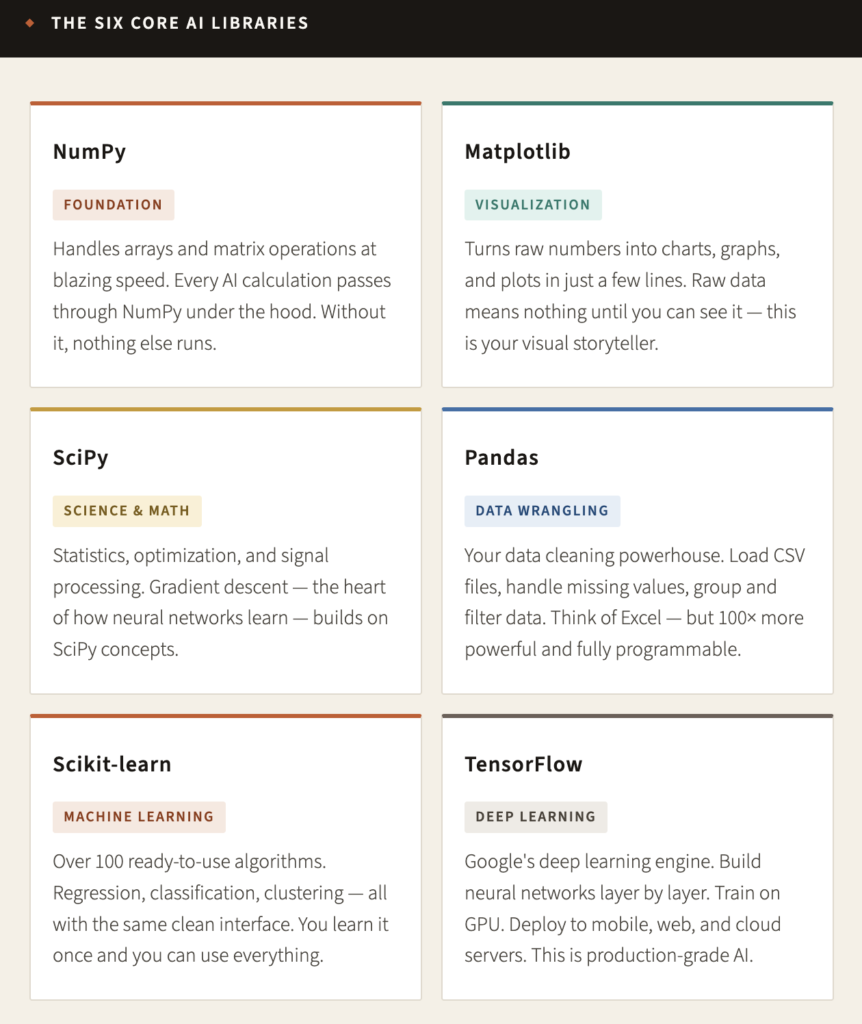
Under the hood: NumPy stores data in a format your processor handles 10–100× faster than regular Python lists. Pandas is the fuel system; NumPy is the engine. SciPy builds directly on NumPy with zero overhead. These libraries don’t just save time — they make AI computationally possible.
The Two Engines of Intelligence
Scikit-learn starts your machine learning journey. Want to predict house prices? Three lines of code. Classify emails as spam? Five lines. Cluster customer data automatically? Two lines. Every algorithm uses the same interface, so you learn the pattern once and apply it everywhere.
TensorFlow takes you deeper. This is how you build neural networks — layer by layer — to recognize images, understand language, and generate art. TensorFlow runs on GPU, which means training that would take days on your laptop finishes in hours. It deploys to mobile phones, web browsers, and cloud servers.
Important: These are the exact tools used at Google, in hospitals, at banks, and at research labs around the world. You are not learning toy software. You are learning real, production-grade AI tools — the same ones professionals use every day.
Your New Best Friend: Jupyter Notebook
Before you install anything, meet Jupyter Notebook — the environment where AI research actually happens.
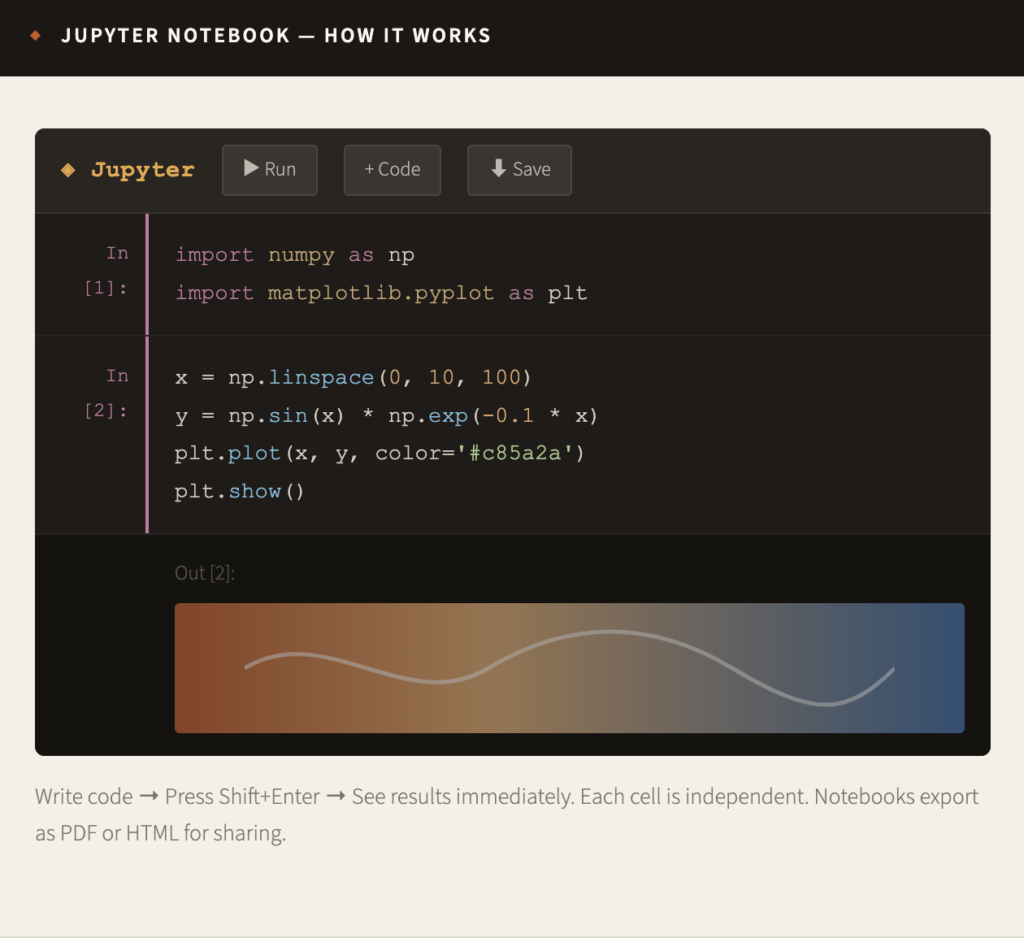
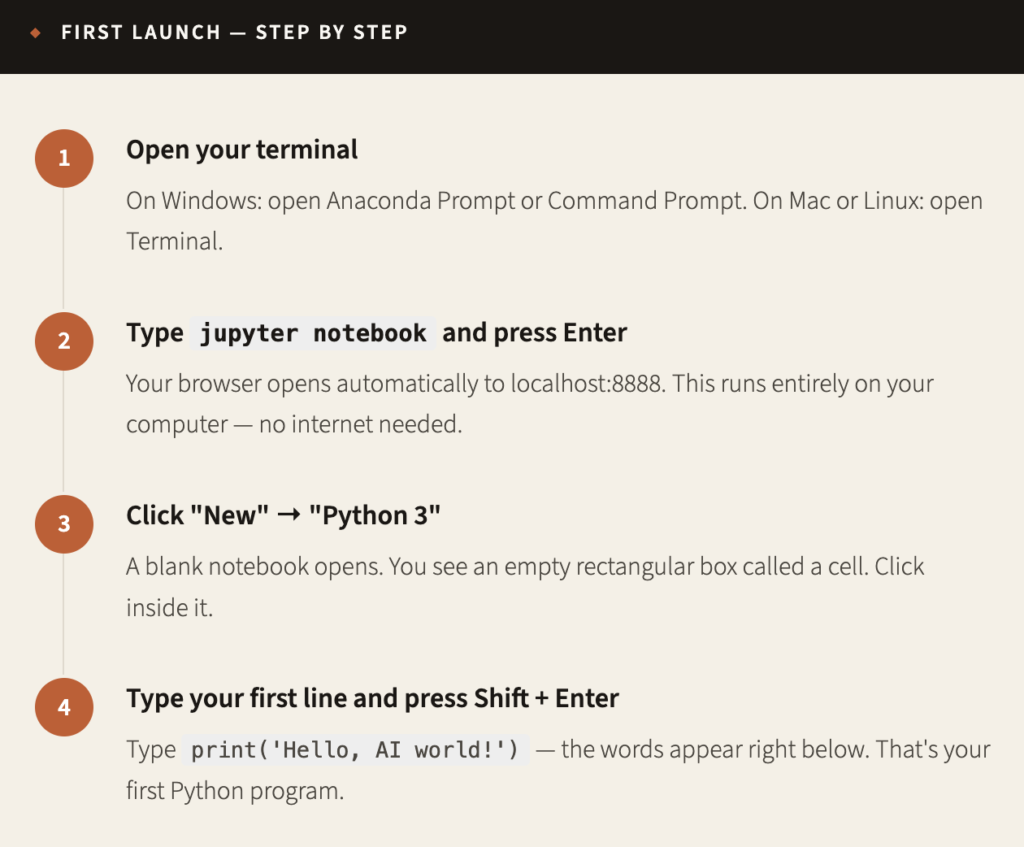
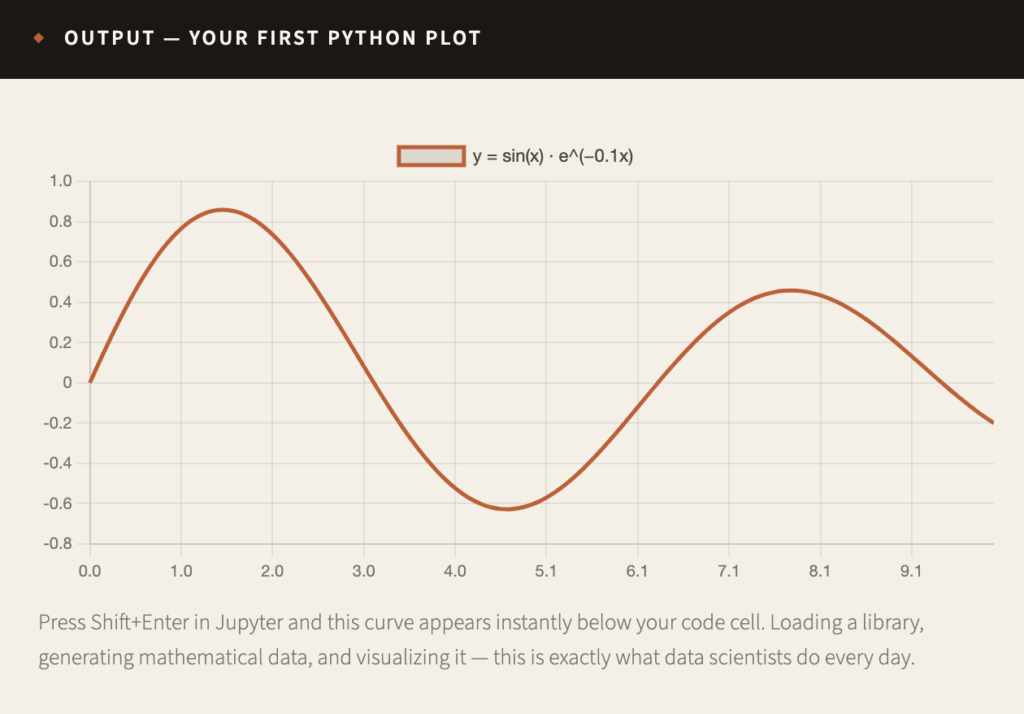
Jupyter is not just a text editor. It is an interactive environment where code, results, charts, and explanations all live together in one place. You write a few lines in a cell. You press Shift + Enter. The result appears right below it — instantly.
This changes everything for learners. Instead of writing everything and hoping for the best, you experiment one step at a time. Something works? Move forward. Something breaks? Fix just that one cell. You can also mix code with written explanations, equations, and images. Your notebook becomes a living document — part code, part tutorial, part report.
How to Install Python
Two methods exist. Both are free. Both work perfectly.
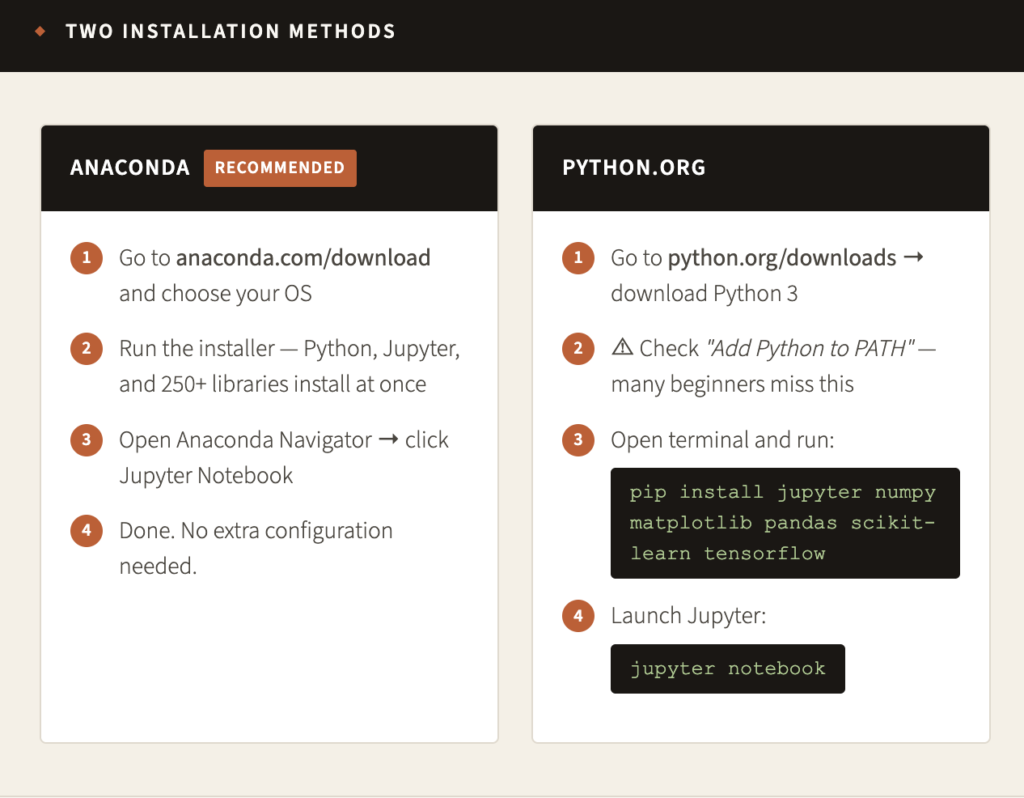
Not sure which to choose? Go with Anaconda. Designers built it specifically for scientific computing and data science. One installer, everything included, nothing to configure.
Launch Your First Notebook
Python is installed. Now let’s run it for the first time. Follow these four steps.
Your First AI Code
Now we write something real. Open Jupyter, create a new notebook, and type exactly what you see below. This code generates a dampened sine wave — beautiful physics in just a few lines
<!-- wp:code -->
<pre class="wp-block-code"><code># Step 1 — Import libraries
import numpy as np
import matplotlib.pyplot as plt

# Step 2 — Create data
x = np.linspace(0, 10, 100)           # 100 points from 0 to 10
y = np.sin(x) * np.exp(-0.1 * x)       # dampened sine wave

# Step 3 — Visualize it
plt.figure(figsize=(10, 4))
plt.plot(x, y, color='#c85a2a', linewidth=2)
plt.title('Dampened Sine Wave')
plt.xlabel('x')
plt.ylabel('Amplitude')
plt.grid(alpha=0.3)
plt.show()</code></pre>
<!-- /wp:code -->
Install Your Complete AI Toolkit
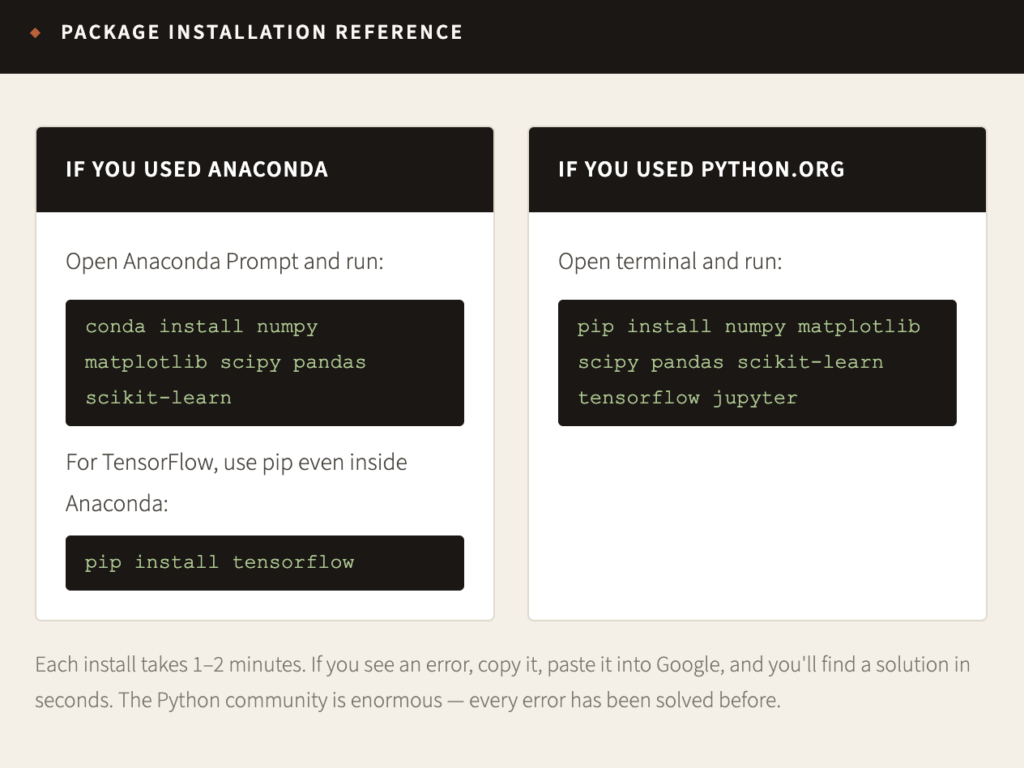
One more step. Install all six libraries so your environment matches a professional data science setup.
“Every expert was once a beginner who refused to give up.”
— Dr. Roshna, Intelevo