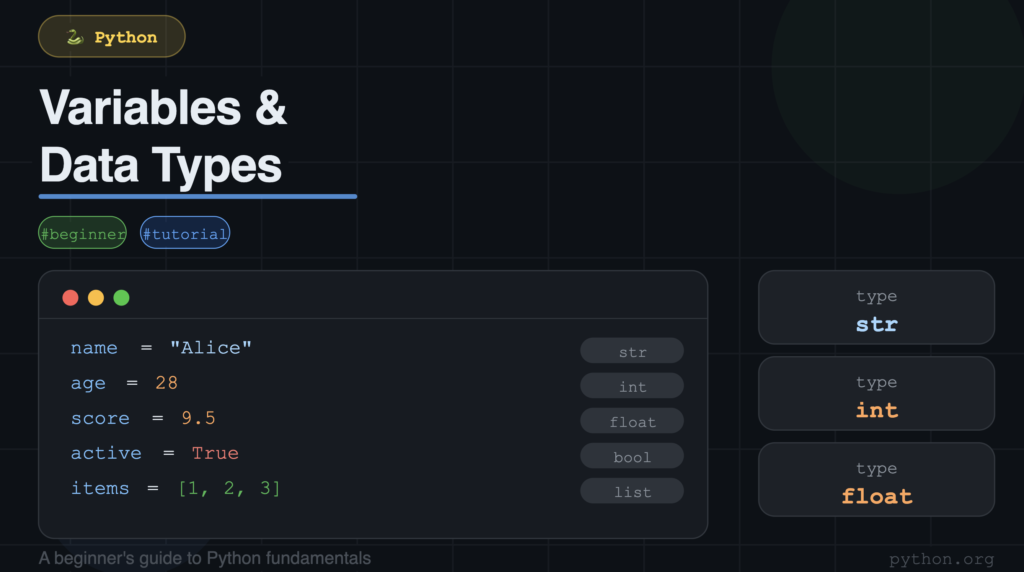
What You Will Learn
Everything a beginner needs to know — with live code, real examples, and zero jargon
This article covers six core topics. Together, they form the foundation of every Python program you will ever write.
- What variables are and how Python stores them in memory
- What identifiers are and the 6 rules you must follow
- All 35 Python keywords — and how to generate them with one line of code
- All 8 built-in data types with real code examples
- How to check and convert types using type(), int(), float(), and str()
- PEP 8 naming conventions that professional Python developers use daily
1. What Is a Variable?
Picture your computer’s memory as a giant warehouse. Inside that warehouse, there are thousands of boxes. Each box holds one piece of data. A variable is the label you stick on a box so you can find it again later.
So when you write this in Python:
name="Intelevo"
Python takes the value “Intelevo”, places it into a memory box, and labels that box as ‘name’. Every time you use the word ‘name’ in your code, Python goes to that box and gives you back the value inside
Your First Variables — Live Code
Here is a simple example that uses four different types of variables in one program:
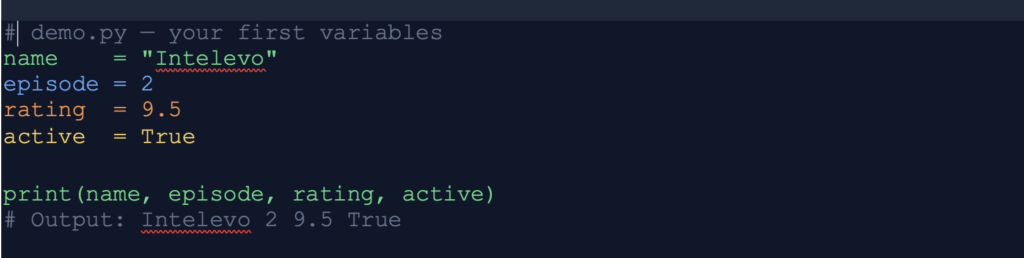
Run this in your Jupyter Notebook. You get all four values printed in one line. Notice how concise it is. That is the Python way.
2. Identifiers — Naming Rules in Python
An identifier is the name you give to any Python entity. Variables, functions, classes, and modules all have identifiers. The name must be unique within its scope, and it must follow strict rules.
The 6 Rules of Identifiers
| # | Rule | Example |
| 1 | Use letters, digits, and underscores only | score_1 my_name _count result2 |
| 2 | Start with a letter or underscore — never a digit | ✅ name _temp ❌ 2name 3score |
| 3 | Python is case-sensitive | name ≠ Name ≠ NAME — three different variables |
| 4 | Never use a Python keyword | ❌ for = 5 ❌ if = True ❌ class = ‘A’ |
| 5 | No spaces allowed — use underscore instead | ✅ my_variable ❌ my variable |
| 6 | No special characters | ❌ @user ❌ $price ❌ result#1 |
Quick quiz: Is “_my_variable” a valid identifier? Yes! An underscore at the start is perfectly fine. Python uses it as a convention for internal or private variables.
Valid vs Invalid — Side by Side
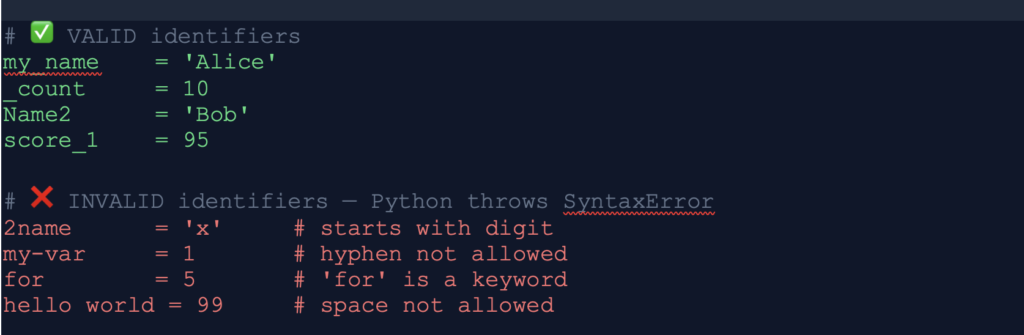
3. Python Keywords — All 35 of Them
Python reserves 35 words for its own use. These are called keywords. They carry a fixed, built-in meaning. You cannot use them as variable names, function names, or any other identifier.
Here is the complete list:
| False | None | True | and | as | assert | async |
| await | break | class | continue | def | del | elif |
| else | except | finally | for | from | global | if |
| import | in | is | lambda | nonlocal | not | or |
| pass | raise | return | try | while | with | yield |
Generate the Full List with Code
Instead of memorising these, generate them programmatically. Run these two lines in your Jupyter Notebook:
import keyword
print(keyword.kwlist)
print(len(keyword.kwlist)
Also notice three keywords that start with capital letters: True, False, and None. Beginners often write them in lowercase. Python will not recognise them and will throw a NameError. Always capitalise these three
Also notice three keywords that start with capital letters: True, False, and None. Beginners often write them in lowercase. Python will not recognise them and will throw a NameError. Always capitalise these three
4. Python Data Types
A data type tells Python what kind of data a variable holds. It also tells Python what operations are legal on that data. Python has 8 built-in data types that you will use in nearly every program.
| Category | Type | Description | Example |
| Numeric | int | Whole numbers — no decimal point | x = 42 |
| Decimal | float | Decimal numbers with a fractional part | pi = 3.14159 |
| Text | str | Any sequence of characters in quotes | name = “Python” |
| Logic | bool | Logical value — only True or False | flag = True |
| List | list | Ordered, changeable collection | lst = [1, 2, 3] |
| Tuple | tuple | Ordered, unchangeable collection | t = (10, 20, 30) |
| Mapping | dict | Key-value pairs — like a real dictionary | d = {“name”: “AI”} |
| Unique | set | Unordered collection of unique values only | s = {1, 2, 3} |
4.1 int — Integer
Integers hold whole numbers. They carry no decimal point. In Python, integers have no size limit. You can work with numbers that have thousands of digits.
Python also supports two helpful formatting features for integers:
# Basic integers
x = 42
y = -7
zero = 0
4.2 float — Decimal Numbers
Floats hold decimal numbers. Whenever you need a number with a fractional part, use float.
However, there is an important thing you must know about floats. Computers store decimals in binary. Binary cannot represent all decimal numbers perfectly. So sometimes you get a tiny rounding error.
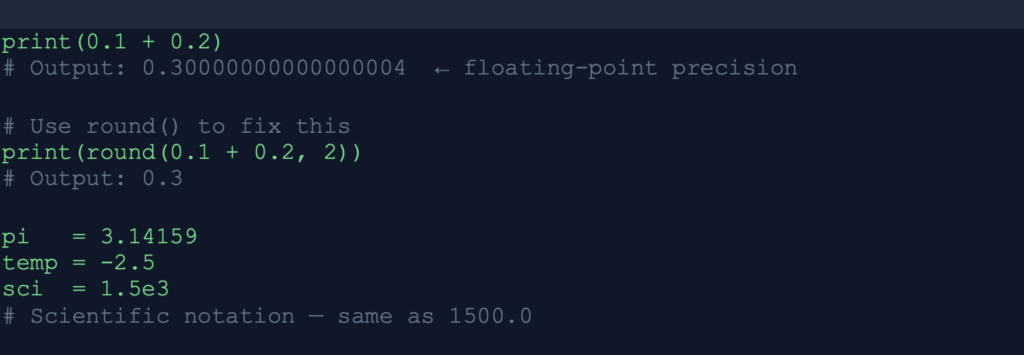
Always use round() when displaying floats to users. Floating-point precision errors look unprofessional in output, but they are completely normal behind the scenes
4.3 str — Strings
Strings hold text. Wrap text in single quotes or double quotes — both work. Python treats them identically.
Strings support many powerful operations:
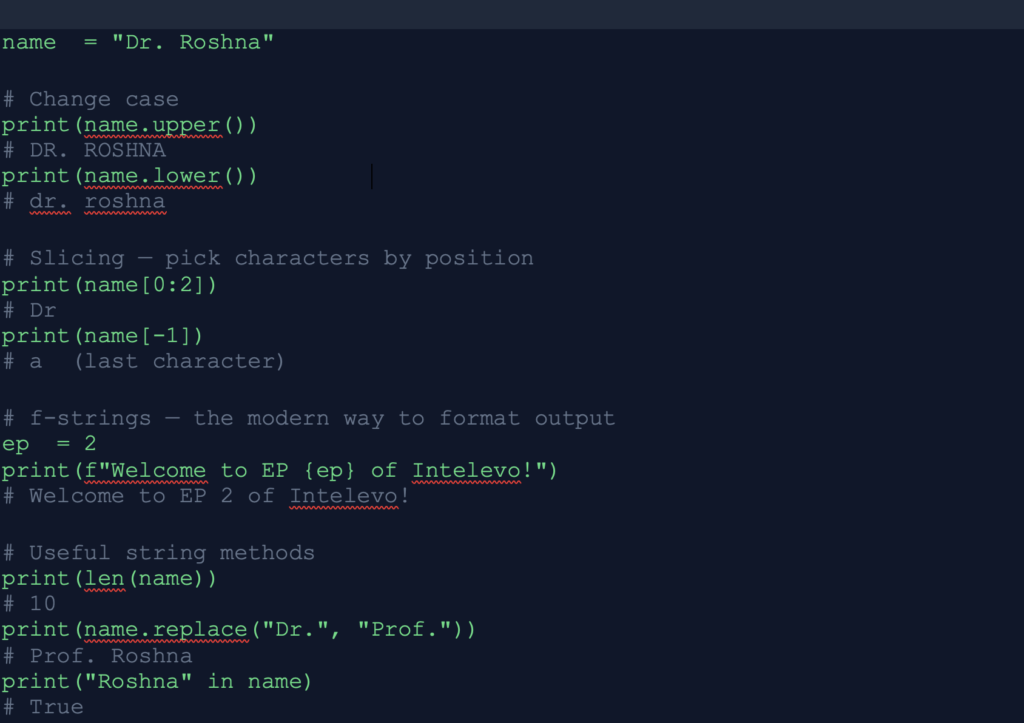
Use f-strings every time you need to embed a variable inside a string. They are faster, cleaner, and more readable than the older % or .format() methods
4.4 bool — Boolean
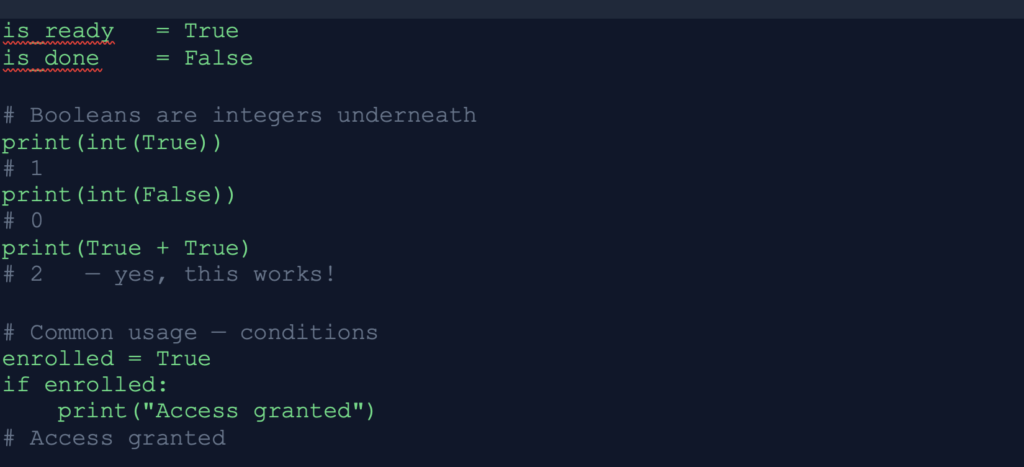
Booleans hold one of two values only: True or False. They control the flow of every program through conditions and logic.
Here is something that surprises many beginners — in Python, True equals 1 and False equals 0 under the hood:
4.5 list — Ordered, Mutable Collection
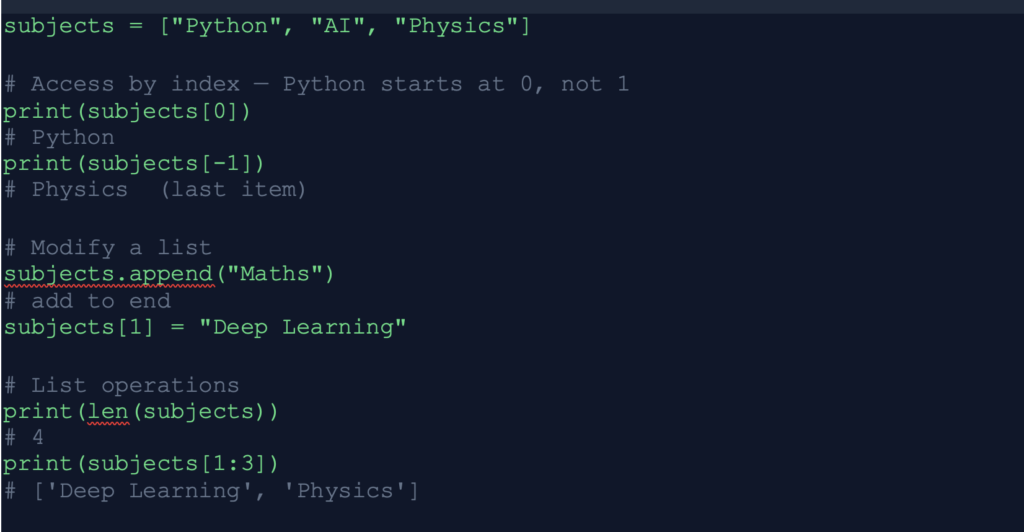
A list holds multiple items in order. You can change, add, and remove items at any time. Square brackets define a list.
4.6 tuple — Ordered, Immutable Collection
Tuples look like lists but use round brackets. The key difference: once you create a tuple, you cannot change it. It is immutable. Use tuples to protect data that must never change — like GPS coordinates, RGB colour values, or database records.
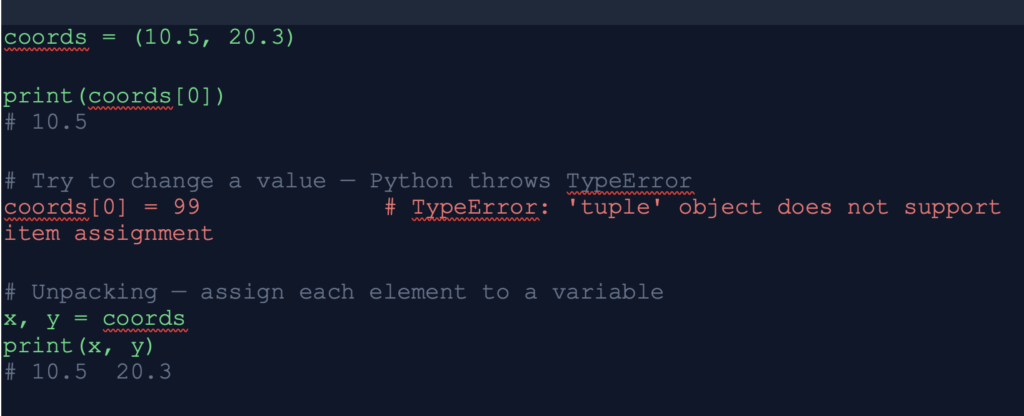
Think of a list as a whiteboard — you can write, erase, and rewrite. Think of a tuple as a stone tablet — carved forever.
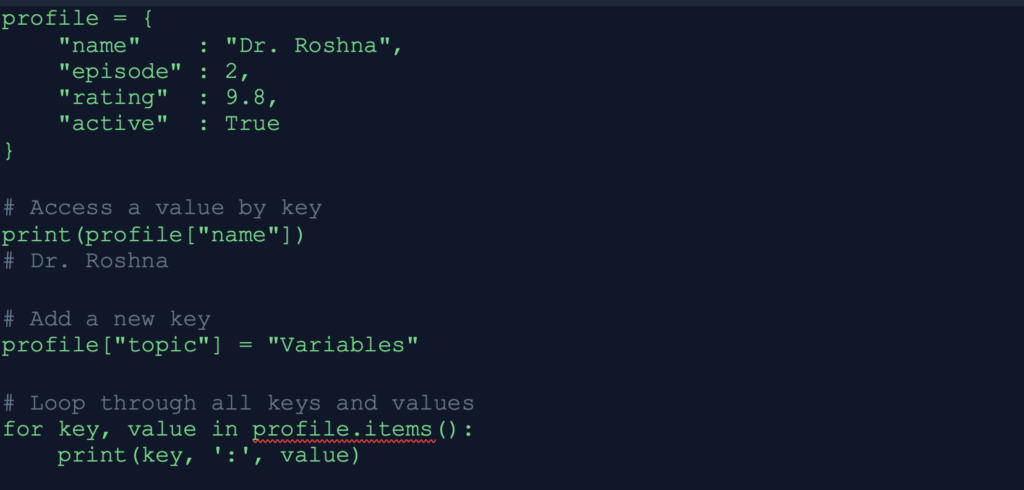
4.7 dict — Dictionary
A dictionary stores data as key-value pairs. Think of a real dictionary: the word is the key, and the definition is the value. You access values by their key, not by position.
Dictionaries appear everywhere in real-world Python. JSON data from APIs, config files, and database query results are all dictionaries.
4.8 set — Unique Values Only
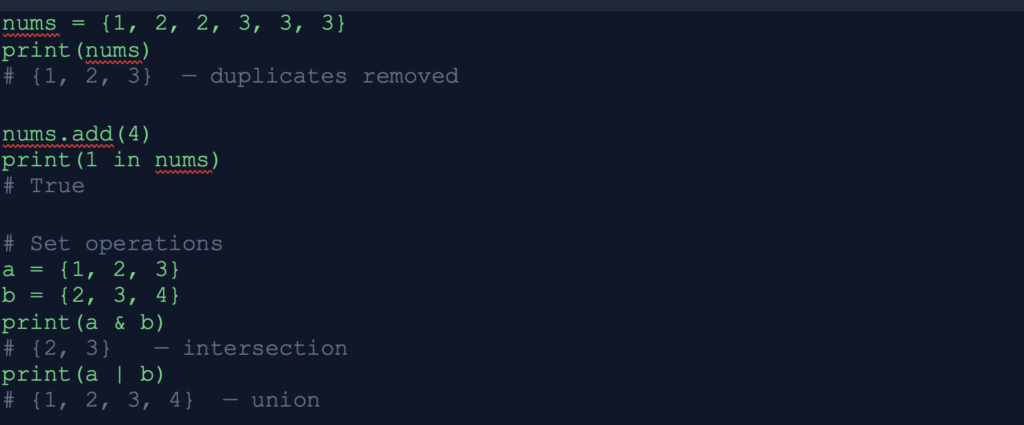
A set stores unique values. If you add a duplicate, Python silently ignores it. Sets do not maintain order. Use sets when uniqueness matters and order does not.
5. Type Checking & Type Conversion
Checking Types with type()
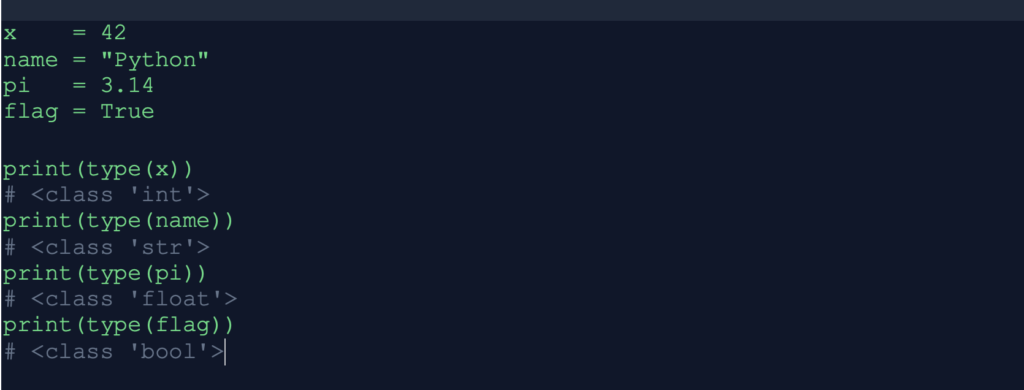
The type() function tells you the exact type of any variable. Use it whenever you receive data from a file, an API, or user input and you are unsure what type you are dealing with.
Converting Between Types
Python provides dedicated conversion functions. Use them to turn one type into another:
| Function | Converts | Example | Result |
| int() | float or str → int | int(3.99) | 3 (truncates, does not round) |
| float() | int or str → float | float(10) | 10.0 |
| str() | int or float → str | str(100) | ‘100’ |
| bool() | any value → bool | bool(0) | False |
| list() | str or tuple → list | list(“hi”) | [‘h’, ‘i’] |
Important: int(‘hello’) will crash. Python can only convert strings that actually look like numbers. int(’50’) works, but int(‘fifty’) throws a ValueError.
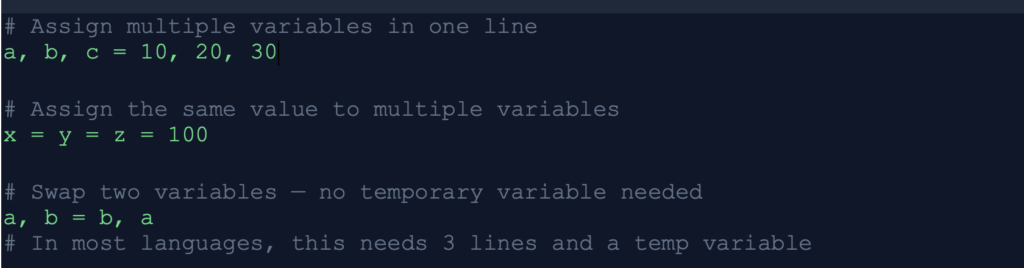
Multiple Assignment — Python’s Superpower
Python lets you do things in one line that take three lines in most other languages:
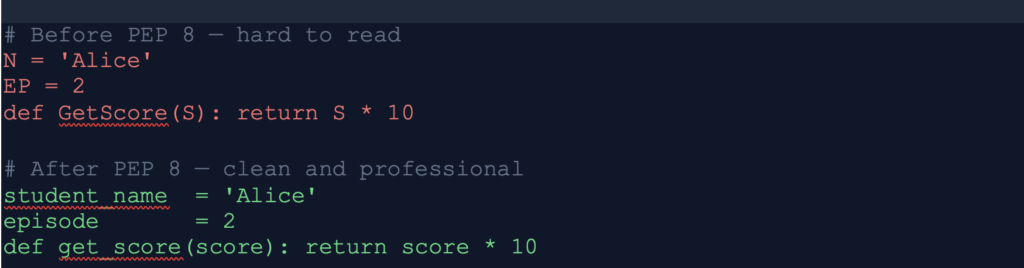
6. Naming Conventions — PEP 8
PEP 8 is Python’s official style guide. It defines how professional Python developers name variables, functions, classes, and constants. Following it costs you nothing. Breaking it makes your code harder to read for every other developer on the planet. Here are the four naming conventions you must know:
| Convention | Used For | Example | Notes |
| snake_case | Variables & functions | user_name get_score() | All lowercase, words separated by _ |
| PascalCase | Classes | StudentProfile AIModel | Each word starts with capital |
| UPPER_CASE | Constants | MAX_SIZE PI API_KEY | Signals: never change this value |
| _leading_under | Private / internal | _helper _count | Signals: do not access from outside |
Google, Meta, NASA, and every major tech company enforce PEP 8 in their Python codebases. Start following it from your very first program. It will feel natural within a week.
7. Live Code Challenge
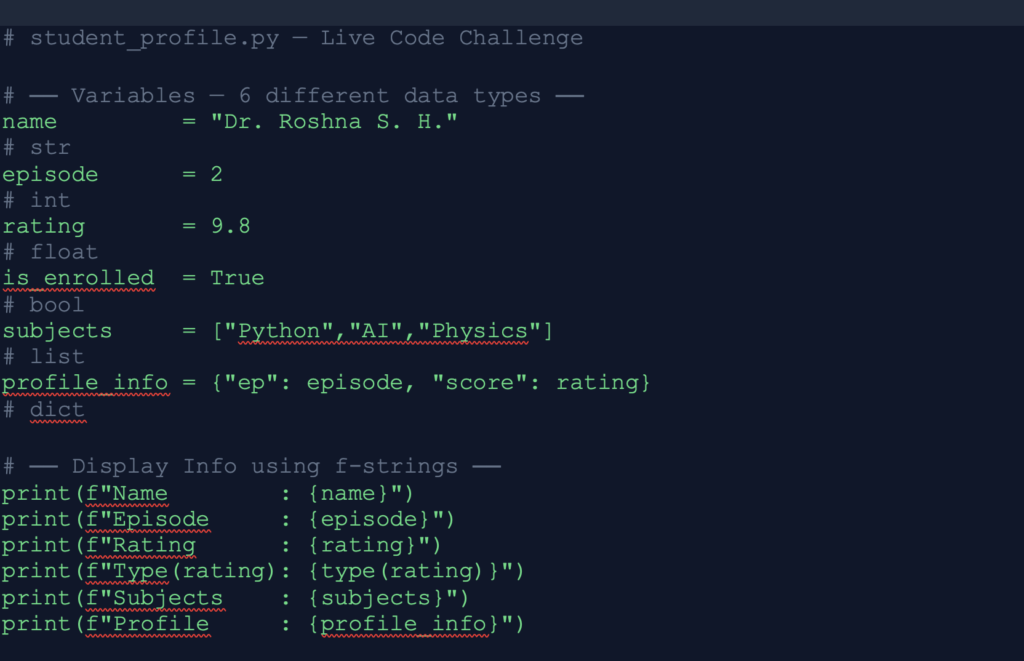
Now it is time to put everything together. Open your Jupyter Notebook and follow along. This program uses all 6 data types, f-strings, the type() function, and PEP 8 naming — all in one place
Expected Output
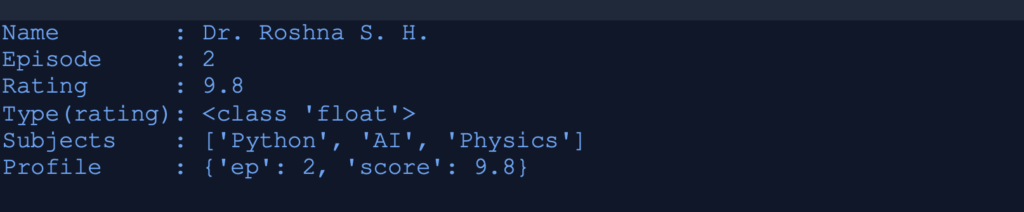
Your challenge: Modify this program. Add your own name. Add two more subjects. Add a new key to the dictionary. Run it. Then drop your output in the YouTube comments — the Intelevo channel reads every single one!
8. Summary
You now understand the building blocks of every Python program. Here is a quick recap of what you covered:
- Variables — named memory boxes. Created on assignment. No declaration needed.
- Identifiers — names for every Python entity. Follow the 6 rules.
- Keywords — 35 reserved words. Use import keyword to list them all.
- Data Types — int, float, str, bool, list, tuple, dict, set.
- Type Tools — type() to check. int(), float(), str() to convert.
- PEP 8 — snake_case for variables, PascalCase for classes, UPPER_CASE for constants.
▶ Next Episode: Operators & Expressions in Python — where you will make Python do math, compare values, and make decisions. See you there!
Enjoyed this article? Here is how to support Intelevo 🙏
Writing this blog takes real effort. If it helped you even a little, here is what you can do right now — and it costs you nothing:
| 👍 Like the Video Go to the Intelevo EP 02 YouTube video and hit Like. It tells the algorithm to show this to more learners. | 🔔 Subscribe Hit Subscribe and the bell. A new episode drops every week. Do not miss Operators & Expressions — it builds on everything here. | 💬 Comment Drop your student profile output in the YouTube comments. Or ask a question. Or tell me — what surprised you most in this episode? |
📖 This article lives on intuitivetutorial.com. Share the link with anyone learning Python or AI. One share can change someone’s learning journey