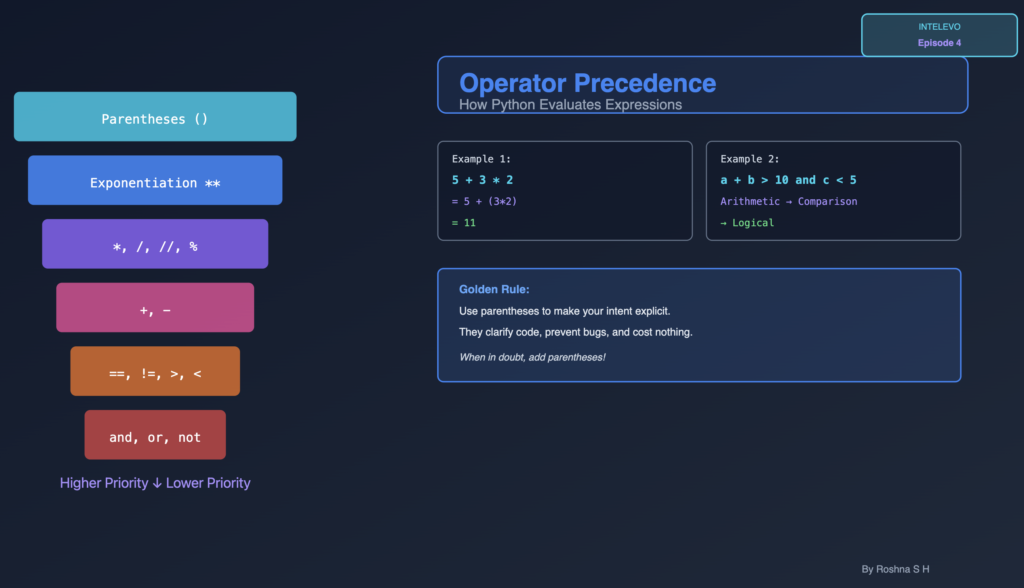
INTELEVO EP 04 – Complete Tutorial for AI & Data Science
In this comprehensive guide: We explore how Python evaluates expressions through operator precedence. You’ll learn the complete precedence hierarchy, see step-by-step evaluations, and discover why parentheses matter. By the end, you’ll predict exactly how Python evaluates any expression you write.
Table of Contents
- Introduction
- What Is an Expression?
- Understanding Operator Precedence
- Arithmetic Expression Evaluation
- Comparison and Logical Expressions
- The Power of Parentheses
- Mixed Operator Expressions
- Real-World Code Examples
- Best Practices
- Summary & Key Takeaways
Introduction: What Is an Expression?
If operators are the tools, then expressions are the work they do. An expression combines values, variables, and operators to produce a result. Python evaluates every expression in a precise, predictable order.
You’ve learned operators in Episode 3. You understand addition, multiplication, comparison, and logical operations. But here’s the critical question: What happens when you combine multiple operators?
Consider this: Does 5 + 3 * 2 equal 16 or 11?
The answer depends on operator precedence. Python evaluates it as 5 + (3 * 2) = 11, not (5 + 3) * 2 = 16.
This isn’t optional knowledge. Precedence determines whether your code works correctly. Misunderstanding it causes subtle bugs that crash programs.
Understanding Operator Precedence
Operator precedence is the set of rules that decides which operations Python performs first. Think of it as the mathematical order of operations—BODMAS or PEMDAS—but for Python specifically.
The Complete Precedence Table:
| Rank | Operator(s) | Description | Association |
|---|---|---|---|
| 1 | () | Parentheses | N/A |
| 2 | ** | Exponentiation | Right-to-Left |
| 3 | +x, -x | Unary plus, minus | Right-to-Left |
| 4 | *, /, //, % | Mult., div., floor div., modulo | Left-to-Right |
| 5 | +, - | Addition, subtraction | Left-to-Right |
| 6 | ==, !=, >, <, >=, <= | Comparison operators | Left-to-Right |
| 7 | not | Logical NOT | Right-to-Left |
| 8 | and | Logical AND | Left-to-Right |
| 9 | or | Logical OR | Left-to-Right |
Three Critical Rules:
Rule 1: Parentheses Always Win
Whatever sits inside parentheses evaluates first. Always. No exceptions.
Without parentheses
result = 5 + 3 * 2 gives 11
With parentheses
result = (5 + 3) * 2 gives 16
Rule 2: Left-to-Right (Usually)
When operators have equal precedence, Python evaluates from left to right.
result = 10 – 5 – 2
Left-to-right: (10 – 5) – 2 = 3
NOT: 10 – (5 – 2) = 7
Rule 3: Right-to-Left (Exponentiation)
Exponentiation is the exception. It evaluates right-to-left.
result = 2 ** 3 ** 2
Right-to-left: 2 ** (3 ** 2) = 512
NOT: (2 ** 3) ** 2 = 64
Arithmetic Expression Evaluation
Let’s evaluate arithmetic expressions step-by-step. Watch how precedence controls the outcome.
Example 1: 5 + 3 * 2
Step 1: Identify operators. Multiplication has higher precedence than addition.
Step 2: Evaluate multiplication first.
5 + 3 * 2
= 5 + (3 * 2)
= 5 + 6
= 11
Example 2: 10 - 2 + 3
Step 1: Both subtraction and addition have equal precedence.
Step 2: Evaluate left-to-right.
10 – 2 + 3
= (10 – 2) + 3
= 8 + 3
= 11
Example 3: 8 + 2 * 3 - 1 / 2
Step 1: Handle multiplication and division first (equal priority, left-to-right).
8 + 2 * 3 – 1 / 2
= 8 + 6 – 0.5
Step 2: Handle addition and subtraction (left-to-right).
= 14 - 0.5
= 13.5
KEY INSIGHT: Division always returns a float in Python 3. So 1 / 2 = 0.5, not 0.
Comparison and Logical Expressions
Comparisons and logical operators have their own precedence level. Master these, and you master complex boolean expressions.
Comparison Chains
Python allows elegant comparison chaining:
Traditional approach
x > 0 and x < 10
Pythonic approach
0 < x < 10
Both mean the same thing, but chaining is cleaner.
More examples:
10 > y >= 5 # Is y between 5 and 10 (inclusive)?
a == b == c # Are all three equal?
x <= y < z # Is y between x and z?
Logical Operator Priority
Study this: NOT > AND > OR
NOT has highest priority. AND beats OR. Most developers get this wrong initially.
Expression: not a or b and c
Evaluation:
not a or b and c
= (not a) or (b and c) # NOT first, then AND, then OR
Example with values:
a = True
b = False
c = True
result = not a or b and c
1. Step 1: not a = not True = False
2. Step 2: b and c = False and True = False
3. Step 3: False or False = False
print(result) # False
Best Practice: Use parentheses with mixed logical operators.
Clear intent
result = (not a) or (b and c)
The Power of Parentheses
Same expression. Different parentheses. Completely different results.
Expression: 10 + 5 * 2
Case 1: Default precedence
10 + 5 * 2
= 10 + 10
= 20
Case 2: Force addition first
(10 + 5) * 2
= 15 * 2
= 30
Case 3: Explicit multiplication
10 + (5 * 2)
= 10 + 10
= 20
The Golden Rule:
Use parentheses liberally to clarify intent and to prevent bugs. They cost nothing.
Professional developers use parentheses even when technically optional. Why? Code gets read far more often than it gets written. Make it easy for readers.
Without parentheses (risky)
if age > 18 and employed and income > 30000 or loan_approved:
grant_visa()
With parentheses (safe).
if (age > 18 and employed and income > 30000) or loan_approved:
grant_visa()
The second version makes intent crystal clear. No ambiguity. No bugs.
Mixed Operator Expressions
Now combine all three types: arithmetic, comparison, and logical operators.
Expression: a + b > 10 and c < 5 where a=5, b=10, c=3
Step 1: Arithmetic operators evaluate first
a + b = 5 + 10 = 15
Expression becomes: 15 > 10 and 3 < 5
Step 2: Comparison operators evaluate next
15 > 10 = True
3 < 5 = True
Expression becomes: True and True
Step 3: Logical operators evaluate last
True and True = True
Final Result: True
The Pattern:
- Arithmetic (Multiplication, Division, Addition, Subtraction)
- Comparison (==, !=, >, <, >=, <=)
- Logical (not, and, or)
Learn this pattern. You now predict any expression’s result.
Real-World Code Examples
Theory matters. But application matters more. Here’s where precedence really impacts your code.
Example 1: Student Eligibility
age = 22
gpa = 3.8
income = 50000
eligible = (age <= 25 and gpa >= 3.5 and income < 100000)
print(eligible) # True
Evaluation:
age <= 25 = True
gpa >= 3.5 = True
income < 100000 = True
True and True and True = True
The parentheses make clear: these three conditions group together for one decision.
Example 2: Passing Status
marks = 65
min_marks = 40
bonus = 5
pass_test = (marks + bonus) >= min_marks
print(pass_test) # True
Evaluation:
Step 1: marks + bonus = 70 (arithmetic first)
Step 2: 70 >= 40 = True (comparison second)
Example 3: Discount Logic
is_member = True
purchase_amount = 150
is_holiday = False
gets_discount = (is_member and purchase_amount > 100) or is_holiday
print(gets_discount) # True
This clarity prevents bugs from misunderstood precedence.
Best Practices
Professional developers follow three core practices. You should too.
Practice 1: Use Parentheses
Make precedence explicit. Don’t rely on readers remembering the precedence table.
Good
if (x > 0) and (y < 10):
process()
Better
if (x > 0 and y < 10) and (z != 5):
process()
Practice 2: Keep Expressions Simple
Complex expressions hide bugs. Break them into steps.
Avoid
result = a + b * c – d / e > 20 and f < 10 or g == h
Better: Break into steps
calculation = a + b * c – d / e
is_valid = calculation > 20 and f < 10
is_special = g == h
result = is_valid or is_special
Practice 3: Use Meaningful Names
Unclear
if age > 18 and gpa >= 3.5 and income < 100000:
award_scholarship()
Clear: Intent is obvious
is_adult = age > 18
meets_gpa = gpa >= 3.5
income_eligible = income < 100000
qualifies = is_adult and meets_gpa and income_eligible
if qualifies:
award_scholarship()
Summary & Key Takeaways
| Concept | Key Point |
|---|---|
| Parentheses | Always evaluate first. Use them liberally. |
| Arithmetic | Multiplication/division before addition/subtraction |
| Comparison | Evaluates after arithmetic |
| Logical | NOT > AND > OR |
| Left-to-Right | Default for equal precedence (except **) |
| Readability | Use parentheses to make intent clear |
Remember These Rules:
- Parentheses override everything – They force evaluation order.
- Multiplication/Division before Addition/Subtraction – Arithmetic precedence matches math class.
- Comparisons after Arithmetic – Always evaluate math first, then compare.
- AND has higher precedence than OR – This trips up beginners.
- Left-to-right is default – But exponentiation goes right-to-left.
- Clarity beats cleverness – Use parentheses even when optional.
What’s Next?
When you understand expressions and precedence, you’re ready for Episode 5: Conditional Statements.
Conditional statements use expressions to make decisions:
- if, elif, else statements
- Nested conditionals
- Real-world decision logic
- Hands-on practice
Expressions are the foundation. Conditionals build on that foundation
Practice Exercises:
- Evaluate:
20 - 5 * 2 + 1(Answer: 11) - Evaluate:
(20 - 5) * 2 + 1(Answer: 31) - Evaluate:
2 ** 3 ** 2(Answer: 512) - Evaluate:
10 > 5 and 3 < 7 or 2 == 3(Answer: True) - Write: A condition that checks if age is between 18 and 65 (inclusive)
Subscribe to Intuitive Tutorials and watch Intelevo for more comprehensive tutorials.